Rinda Logo
Rinda FieldNow on Google Play

Trade show cards today, buyer list by tonight

Snap the card, record the meeting. Rinda does the typing and the summary. Talk to buyers in 60 languages without an interpreter.
  • Connects with your Rinda account in a minute
  • 1,100 companies use Rinda
Card scan3 shots
Got it — next card, please
Sarah DuboisHead Buyer · Lumière Paris
[email protected]
AutoWide
Done — 3 cards

Companies already meeting buyers with Rinda

  • 창신리빙 — Rinda 파트너 기업
  • DERMAFIX — Rinda 파트너 기업
  • ICTUS HOME — Rinda 파트너 기업
  • SPERONE — Rinda 파트너 기업
  • RIONIX — Rinda 파트너 기업
  • Ys medi — Rinda 파트너 기업
  • LBN — Rinda 파트너 기업
  • STELLA.K — Rinda 파트너 기업
Three show days, one phone

Snap the cards 12 saved,
record the meetings Interpreting,
and Rinda handles the follow-up Email draft.

What happens at the booth turns into next steps on the spot. Nothing left to type up when you get home.

Bring it to shows like these

  • Cosmoprof
  • GULFOOD
  • Anuga
  • SIAL Paris
  • CES
  • Hannover Messe
  • MEDICA
  • Canton Fair
  • FOODEX JAPAN
  • THAIFEX
  • Arab Health
  • Beautyworld Middle East

Pick the buyer's language and interpretation switches on. 60 languages.

What the app does

Four things that eat your time at the booth

Real app screens.

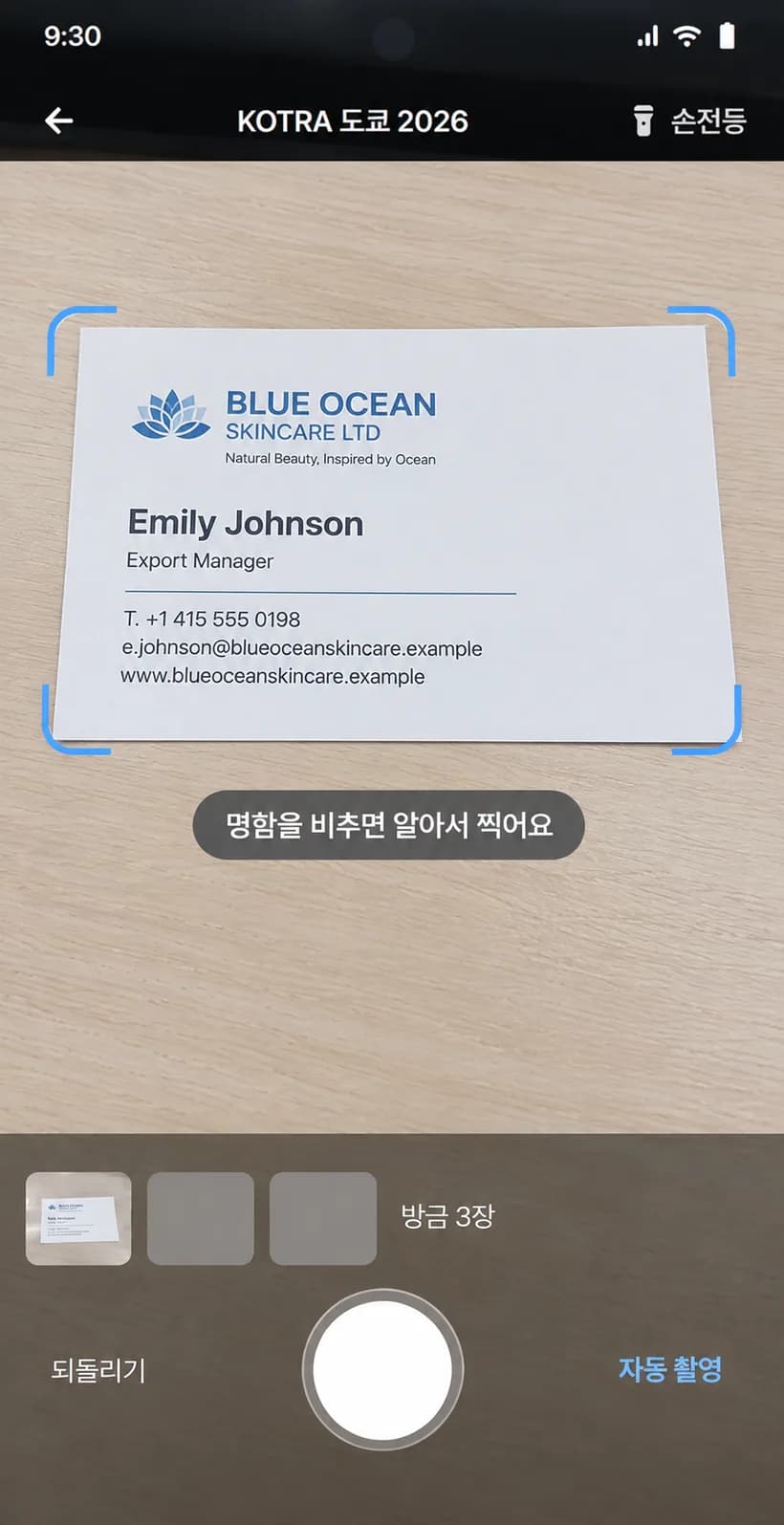
Card scan

Snap a card, get a buyer

Shoot cards back to back right where you receive them. Line the card up in the frame, the app fires the shutter, and the name, company, and email land in your buyer list.

  • Auto shutter for back-to-back shots
  • Name, company, and email read automatically
  • Works when the hall Wi-Fi drops — uploads once you're back online
  • Grouped by trade show
Card scan3 shots
Got it — next card, please
Sarah DuboisHead Buyer · Lumière Paris
[email protected]
AutoWide
Done — 3 cards
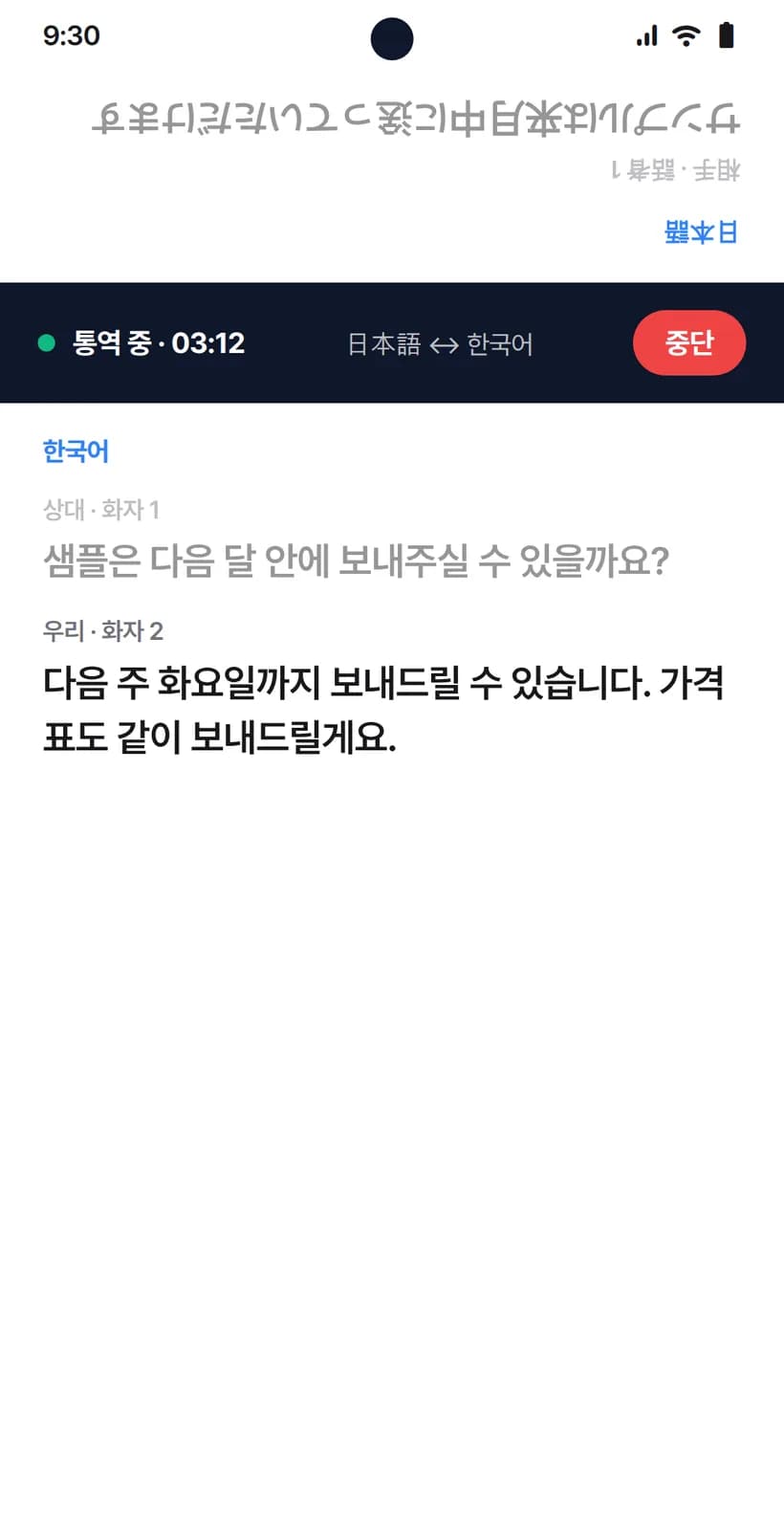
Live interpreter

Meetings run without an interpreter

Pick the buyer's language and the screen splits top and bottom. Set the phone between you and each side reads in their own language.

  • 60 languages
  • Split screen, read face to face
  • Shows "May I record this?" in the buyer's language
  • Record without interpretation if you prefer
Their side · FrançaisPourriez-vous faire 500 unités pour la première commande ?
Interpreting12:40Stop
Your side · EnglishCould you do 500 units for the first order?Yes — 500 to start, and the unit price drops at 1,000.
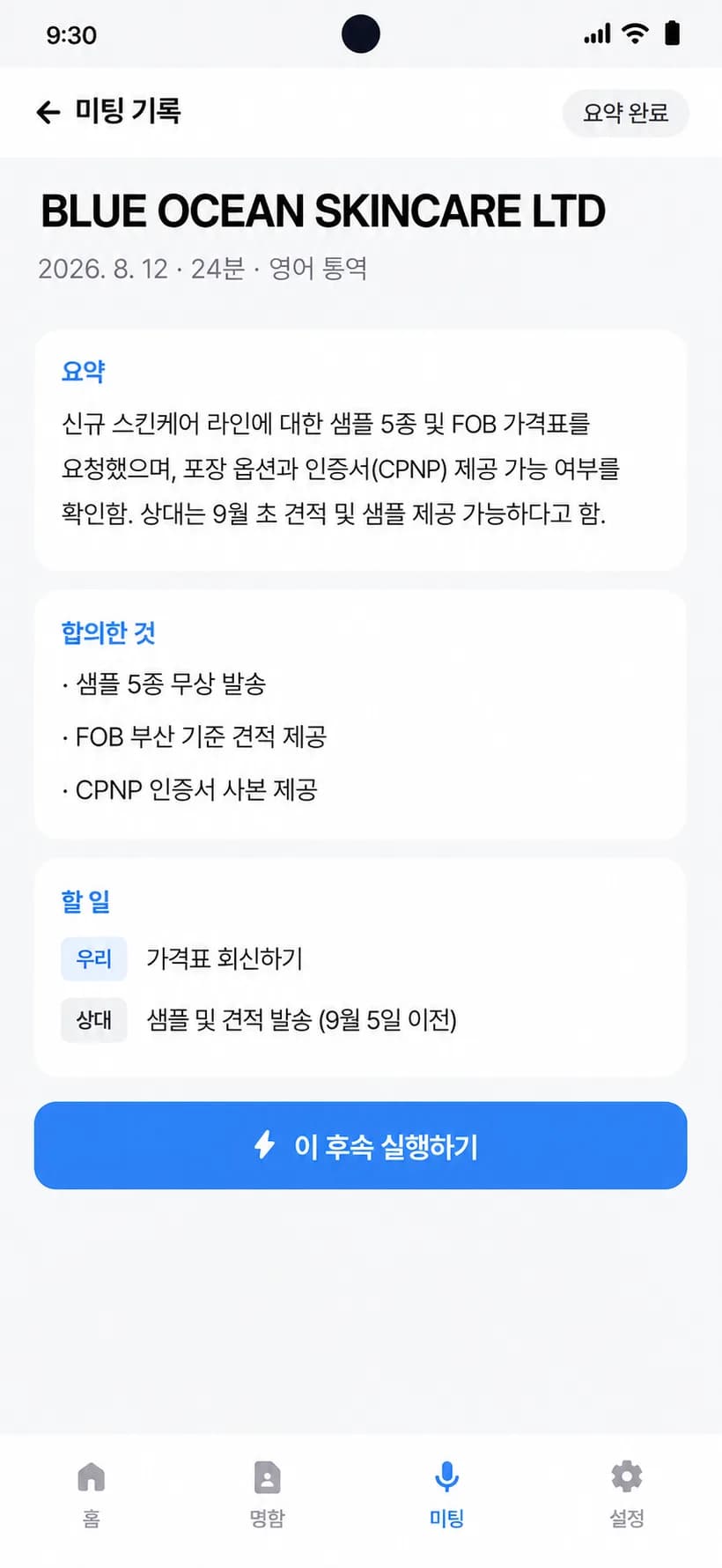
Meeting recap

Stop recording, get a summary and to-dos

Stay in the conversation. When it ends, you have what was discussed and who agreed to do what.

  • Summary as soon as you stop
  • To-dos split into yours and theirs
  • Suggests the next step
Meeting recapLumière ParisSummary ready
Summary

Interested in the LED mask. CE certification confirmed. Considering a November order.

To-dos
UsSend catalog PDF
UsQuote for 1,000 units
ThemConfirm November volume
Next step
Send the email
Today

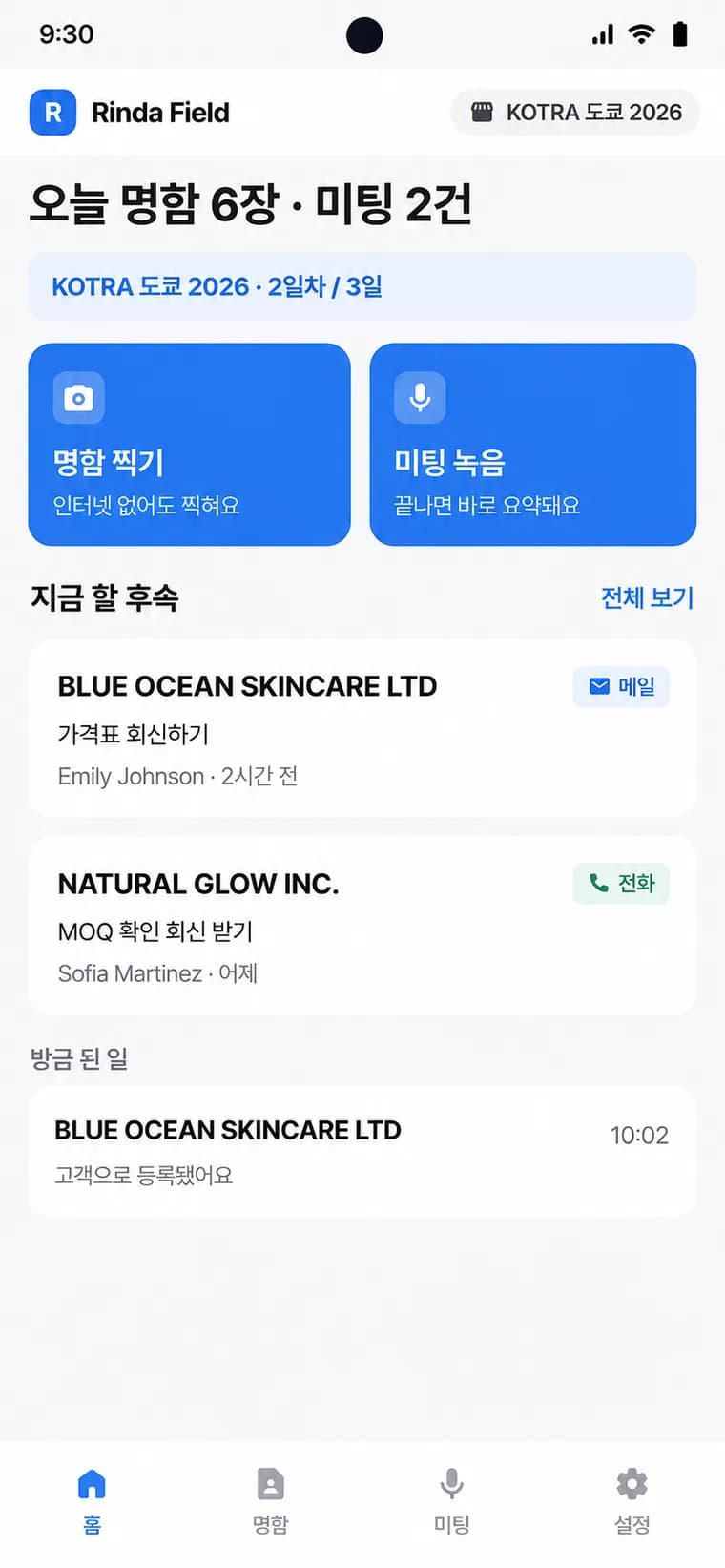
Today's follow-ups sit at the top

Cards from today, finished meetings, and the follow-ups due now on one screen. One look in the morning tells you whether a buyer slipped through.

  • Today's numbers at a glance
  • Urgent follow-ups first
  • Pick a show to see only that event
RRinda FieldK-Beauty Expo

Today: 12 cards · 3 meetings

Do next2
Sarah Dubois · Lumière ParisSend catalog PDF
Baltex GmbHQuote for 1,000 units
Scan cardsWorks offlineRecord meetingSummarized when you stop
Just done
Lumière ParisRegistered as a buyer14:02
By hand · With Rinda Field

See where trade show results leak away

You lose buyers in the sorting after the show, not in the three days at the booth.

Card sorting

By handTyped into a spreadsheet one by one, back at the office

With Rinda FieldIn your buyer list the moment you snap it

Interpretation

By handBook an interpreter, or gesture when you can't

With Rinda FieldPick the language and go

Meeting notes

By handScribbles and memory

With Rinda FieldStop recording, get a summary and to-dos

Follow-up email

By handTwo weeks later, when the faces have blurred

With Rinda FieldThat night, with the summary open

Day one at the show

From booth opening to the hotel, here's how the day goes

  1. 09:00

    Booth opens

    Snap the cards as you receive them. 12 companies are saved as buyers on the spot.

  2. 11:30

    Buyer meeting

    Turn on interpretation and the screen splits in two. The meeting runs even on days you couldn't book an interpreter.

  3. 14:00

    Meeting ends

    Stop recording — the summary and three to-dos are already there.

  4. 22:10

    Hotel

    Send follow-up emails to today's buyers. The cards are already sorted.

  5. Next day

    Office

    The buyers are on the web too. Your team takes it from there.

Same workspace as the web

Snap it at the booth, see it at the office

Cards you snap at the booth show up for your team back at the office right away. Follow-up emails go out from Rinda's email tools on the web.

On site · App

Office · Web

Card scan
Buyer list
Meeting recording
Meeting desk
To-dos
Follow-up email

The app and the web share one account and one set of data. Nothing to move over.

Getting started

From install to first card in about a minute

  1. 1

    Get Rinda Field on Google Play

    Android only

  2. 2

    Enter the email you use with Rinda, then the 6-digit code from your inbox

    Connects with just your phone — no admin QR needed

  3. 3

    Pick your trade show and snap the first card

    No Rinda account yet? Create one from [Sign up] inside the app

No Rinda account yet? Start a 2-week free trial on the web, then connect the app with the same account.

Common questions

Things you might be wondering

Starting with your next show, no more card sorting

Install for free, connect your Rinda account, done.